Retail IT Incident Response: A 2026 Practical Guide
Updated: Aug 7

Most retail IT teams assume they are prepared for a crisis. They have a documented plan, maybe a laminated checklist near the server rack, and a general sense of who to call. Then a real incident hits during Black Friday, and the plan falls apart in the first ten minutes. Understanding what is retail IT incident response, not just in theory but as a living, executable practice, is what separates teams that contain damage quickly from teams that watch revenue bleed while they argue over who has authority to act. This guide covers the workflows, tools, and strategic decisions that actually matter.
Table of Contents
Key takeaways
Point | Details |
Retail incidents are revenue events | Every minute of downtime costs money, making speed and authority more critical than documentation. |
Plans fail without executive alignment | Pre-authorized decision rights at the leadership level prevent costly delays during active incidents. |
Automation accelerates response | AI-assisted triage and orchestration platforms reduce mean time to resolution across distributed retail environments. |
Business MTTR beats technical MTTR | Full checkout and payment recovery is the true recovery benchmark, not server restart time. |
Compliance requires living audit trails | PCI DSS 4.0 demands timestamped, immutable records that manual documentation cannot reliably produce. |
What makes retail IT incident response different
Not all IT incidents are created equal. A database outage at a software company is frustrating. The same outage at a retailer during a peak sales window is a direct hit to revenue per minute. That difference in stakes is what defines retail IT incident response as its own discipline.
Retail environments are also architecturally complex in ways that most industries are not. A single brand may run dozens of physical locations, a high-traffic e-commerce platform, regional distribution centers, and third-party fulfillment partners simultaneously. An incident in one layer can cascade into the others within minutes. Payment processing failures, for example, do not stay isolated to the point-of-sale terminal. They ripple into inventory reconciliation, customer order status, and fraud detection systems all at once.
The types of incidents retail teams face add another layer of complexity. Retail saw 997 digital incidents in 2025, with the top breach types being system intrusion, web application attacks, and social engineering. These are not accidents waiting to be cleaned up quietly. They are targeted, financially motivated attacks that require coordinated responses across IT, customer support, legal, logistics, and PR teams working at the same time.
Compliance adds pressure on top of operational urgency. PCI DSS v4.0 requires retailers to maintain documented incident response plans that cover communication protocols, containment steps, and audit-ready timelines. Meeting those requirements during an active incident, while also trying to restore services and protect customers, is genuinely difficult without pre-built processes.
Pro Tip: Map every major incident type your environment is likely to face (web attacks, ransomware, credential abuse) to a specific response owner before an incident occurs. Ambiguity about who leads which response track is one of the most common and most avoidable failure points.
Core components of an effective response workflow
A retail IT incident response workflow is not a single process. It is a sequence of coordinated decisions and actions that move from detection to recovery, with clear owners at each stage.
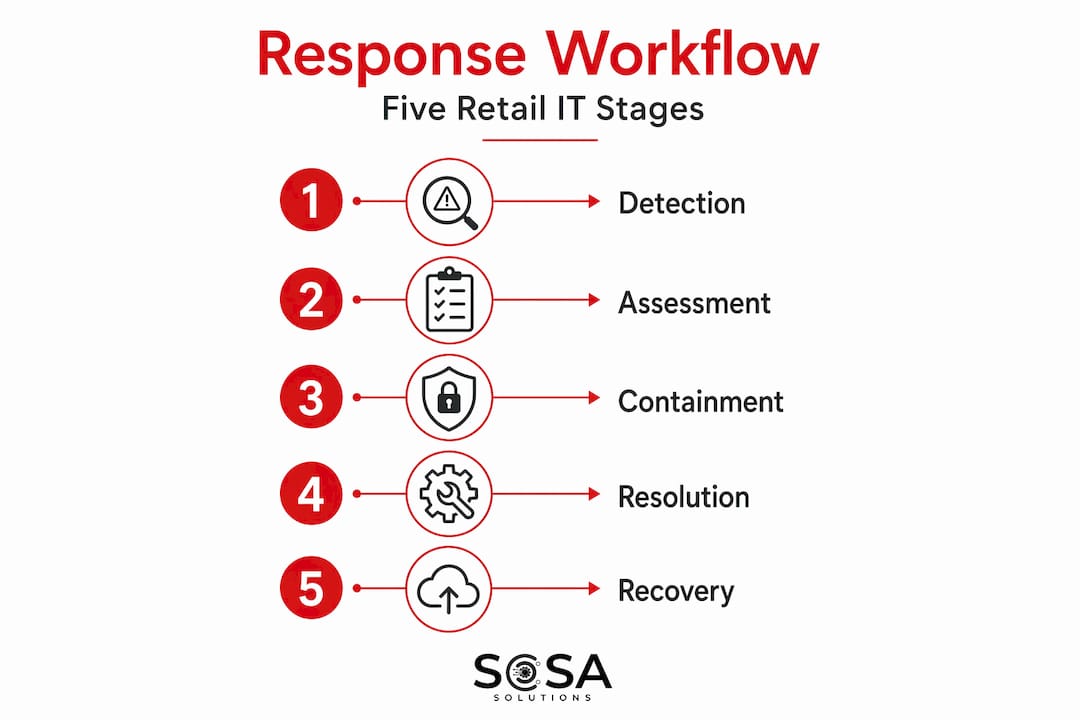
Detection and prioritization come first. The best teams weight severity by revenue impact, not just technical severity. A degraded API that slows checkout by three seconds during peak traffic is functionally more critical than a back-office reporting failure, even if the technical complexity is reversed. Documenting business impact within the first 15 minutes of an incident improves communication and significantly reduces reputation damage. Building that revenue-impact framing into your triage criteria makes the difference between a well-prioritized response and a technically correct but commercially disastrous one.
Once detected and categorized, the response workflow typically moves through these stages:
Automated alert and team mobilization. Monitoring tools detect the anomaly, trigger alerts, and notify the right people through predefined channels based on incident type and severity.
Incident triage and impact assessment. The on-call engineer or incident commander assesses scope, assigns an initial severity level weighted by revenue exposure, and opens the incident channel.
Containment decision and execution. Pre-authorized teams isolate affected systems, block attack vectors, or roll back changes. This is where executive pre-authorization matters most.
Cross-functional communication. Engineers focus on the technical fix. A separate communication lead updates customer-facing status pages and coordinates with PR, legal, and customer support.
Resolution and recovery. Systems are restored, monitored for stability, and cleared for full traffic.
Post-incident review. The team documents what happened, why it happened, and what changes will prevent recurrence.
Workflow stage | Owner | Primary tool |
Detection | Monitoring platform | Alerting and observability stack |
Triage | Incident commander | Orchestration platform |
Containment | Engineering lead | Runbook automation |
Communication | Communications lead | Status page and Slack |
Recovery | Cross-functional team | Runbook and manual verification |
Post-incident review | IT manager or CISO | Audit trail and documentation |
One of the most critical and frequently missed components is pre-authorized executive decision rights. During a ransomware attack, for example, someone needs the authority to decide on notification timelines or containment actions without waiting for a three-hour approval chain. That authority must be granted before the incident, not during it.
Pro Tip: PCI DSS 4.0 compliance requires immutable, timestamped audit logs capturing decisions and actions in real time. Relying on someone to manually document events after the fact during an active incident is a compliance risk and a factual reliability problem. Use tools that log automatically.
Technology and tools powering retail response in 2026
The gap between retail teams that resolve incidents quickly and those that struggle for hours often comes down to tooling. Automation and AI significantly reduce MTTR by removing routine coordination tasks from human hands and letting engineers focus on actual problem-solving.
Here is what a well-equipped retail incident response technology stack looks like in 2026:
Incident orchestration platforms. These tools connect alerts from monitoring systems, assign responders, trigger runbooks, and maintain audit trails in one place. They eliminate the manual overhead of coordinating across disconnected tools during high-stress moments.
Agentic AI for summarization. AI agents can synthesize incident timelines, generate status updates, and surface relevant historical context automatically. This is particularly valuable during long-running incidents where incoming team members need to get up to speed fast without reading through hundreds of messages.
Slack-native communication workflows. Keeping response coordination inside a single, familiar communication tool reduces context switching. Automated status page updates pushed through Slack mean the communications lead can keep customers informed without interrupting the engineering channel.
Real-time leadership dashboards. Executives should have visibility into incident status without inserting themselves into the technical response channel. A live dashboard showing severity, affected systems, estimated resolution time, and business impact keeps leadership informed without creating noise for engineers.
Immutable audit trail logging. Every decision, action, and timeline entry needs to be captured automatically for PCI DSS audit readiness. Platforms that write timestamped, tamper-proof logs are not optional for retailers handling payment data.
For retail teams that rely on WooCommerce integrations, tools like SquareSync for Woo can play a supporting role in maintaining payment system continuity, which is directly relevant when an incident threatens checkout functionality.
Understanding IT support response time in retail and its direct relationship to customer satisfaction is foundational context for why tool investment in this area pays off operationally.
Best practices to optimize your incident response
Knowing the workflow and having the tools is the starting point. These practices separate teams that continuously improve from teams that repeat the same mistakes under pressure.
Frequent simulation exercises are the single highest-return investment most retail teams are not making consistently. 99% of retailers have formal response plans, but 73% are not fully ready to execute under a real attack. The gap between documentation and readiness is almost always a practice gap. Run cross-functional tabletop exercises at least quarterly. Include executives. Include customer support leads. Make the scenarios realistic enough to expose actual gaps, not just validate the parts that already work.

Map your technical services to business functions and revenue criticality. Your checkout API, your inventory sync, your loyalty program database, and your customer authentication system all have different revenue weights. A severity matrix that factors in those weights ensures that when multiple systems are affected, your team knows what to fix first.
Establish clear escalation and decision authority before an incident forces the conversation. Who can authorize a system shutdown that affects live sales? Who communicates with the press? Who decides whether to pay a ransom? These conversations need to happen in a calm room, not during an active attack.
Pro Tip: Track both technical MTTR and business MTTR for checkout recovery. A server technically restarted in 20 minutes is not a 20-minute recovery if payment processing stayed down for an additional 40 minutes due to dependent service failures. Measure what customers actually experience.
Balance security responses with commercial continuity. Shutting down your entire e-commerce platform as an immediate containment step might be the technically correct security response but commercially devastating. Integrating security with business operations means evaluating containment options on a spectrum rather than defaulting to maximum restriction.
Common mistakes and how to avoid them
Even well-resourced retail IT teams make predictable mistakes. Recognizing them in advance is how you avoid repeating them.
Overconfidence in documentation. Having a written plan is not the same as being ready to execute it. Plans that have never been practiced under pressure will fail at the moment they matter most. The 73% of retailers not ready to execute under a real attack are mostly teams with plans that exist on paper and nowhere else.
No executive pre-authorization. When an engineer identifies a containment step that requires a business decision, and there is no pre-authorized authority available at 2 AM, the incident stalls. Every minute of delay has a direct cost. Average major incident resolution takes 2.77 hours, and 26% of incidents exceed four hours, which is unacceptable during peak retail periods.
Fragmented communication channels. When engineers are working in one Slack channel, customer support is emailing leadership, and PR is calling the incident commander directly, critical information gets missed and contradictory updates get sent to customers. Designate a single source of truth for each audience before incidents happen.
Reactive rather than contextual alerting. Generic alerts that fire without business context slow triage. An alert that says “checkout API latency elevated 40% above baseline on a Saturday afternoon in November” is far more useful than “API response time: 850ms.” Build business context into your alerting logic.
Skipping post-incident reviews. When the incident is resolved and systems are stable, the natural instinct is to move on. Teams that skip structured retrospectives are doomed to face the same failure modes again.
Manual audit trail maintenance. During a fast-moving incident, manually logging every decision and action is unrealistic. Automated timeline capture for PCI DSS compliance is not a luxury for retailers handling payment data. It is a regulatory necessity and a factual record that protects you during audits.
“The most dangerous assumption in retail incident response is that a documented plan equals readiness. Plans are inert. Readiness is earned through practice, executive alignment, and ruthless honesty about where your response breaks down.”
My perspective: what retail teams consistently get wrong
I have worked with retail IT teams across a range of sizes and geographies, and the pattern I keep seeing is not a lack of plans. It is a lack of respect for how different a real incident feels compared to a documented procedure.
In my experience, the teams that handle incidents best treat their response playbook the way a flight crew treats emergency checklists. Not as something you read after the crisis starts, but something you have internalized through repetition so thoroughly that execution is almost instinctive. That level of readiness requires executives in the room during simulations, not just IT staff. When a CISO has personally walked through a ransomware scenario with the board, the pre-authorization conversation has already happened. The crisis is not the time to introduce those decisions.
What I also find underappreciated is the tension between security instincts and commercial reality. A security-first response will often recommend maximum isolation. But in retail, maximum isolation during peak trading can cost more than the incident itself. I am not suggesting retailers compromise on security. I am suggesting that your response options need to be designed with that commercial reality in mind, so the team is choosing between calibrated options rather than defaulting to the most restrictive one under pressure. Automation supports routine decisions, but the judgment calls in those high-stakes moments still need human context and pre-built authority to execute quickly.
— Christopher
How Sosasolutionsnyc helps retail teams stay ready

Retail IT incident response is only as strong as the infrastructure and support behind it. Sosasolutionsnyc works with retail businesses across New York and Florida to build the kind of IT foundation that makes incident response actually executable, not just documented. From 24/7 monitoring and on-site troubleshooting to compliance-ready infrastructure and retail IT support services designed for fast-moving environments, Sosasolutionsnyc functions as an extension of your team. If you are opening a new location and want incident readiness built in from day one, their store opening IT solutions cover system setup and infrastructure readiness end to end. For ongoing managed support and incident response backing, explore their managed IT services built specifically for retail and small to medium-sized businesses.
FAQ
What is retail IT incident response?
Retail IT incident response is the structured process by which retail organizations detect, contain, resolve, and learn from technology failures or security events. It differs from general IT incident response because it prioritizes revenue continuity, customer-facing systems, and compliance with standards like PCI DSS.
What are the most common IT incidents in retail?
The most common incidents include system intrusion, web application attacks, and social engineering targeting payment or customer data. Retail saw 997 digital incidents in 2025, with the majority being externally motivated and financially driven.
How long does it typically take to resolve a major retail IT incident?
The average resolution time for major retail incidents is 2.77 hours, with 26% of incidents taking longer than four hours. Automation, pre-authorized decision rights, and practiced workflows are the primary levers for reducing that number.
Why do retail incident response plans fail in practice?
Most failures trace back to ambiguous decision authority, untested escalation paths, and plans that exist only on paper. 73% of retailers with formal plans are not fully ready to execute under a real attack, primarily because those plans have never been practiced with cross-functional teams.
What does PCI DSS require for retail incident response?
PCI DSS v4.0 requires retailers to maintain documented incident response procedures, defined communication protocols, and immutable audit trails with timestamped logs capturing actions and decisions in real time during security events.
Recommended


Comments