Multi-Location IT Management for SMBs: 2026 Guide

Multi-location IT management for SMBs is defined as the centralized oversight of technology infrastructure, security, and support across two or more business sites under a unified strategy. Nearly 50% of small businesses suffer cyberattacks each year. That number alone makes consistent, site-wide IT governance a business survival issue, not just an operational preference. The industry term for this discipline is multi-site IT governance, and it covers everything from endpoint management and network monitoring to help desk operations and disaster recovery. SMBs that get this right run tighter operations, spend less on reactive fixes, and scale without chaos.
What does multi-location IT management for SMBs require?
The foundation of any multi-site IT strategy is a clear picture of what you already have. IT management involves strategic investments, infrastructure monitoring, and change management to avoid negative business impact when scaling. Before adding tools or staff, you need a full inventory of every device, application, and network connection across all sites.
The core infrastructure stack for multi-location SMBs includes:
Networking: Site-to-site VPN or SD-WAN connections to link locations securely
Endpoints: Laptops, desktops, point-of-sale terminals, and mobile devices enrolled in a unified endpoint management (UEM) platform
Cloud services: Microsoft 365 or Google Workspace for productivity, plus cloud-based backup and storage
Security controls: Multi-factor authentication (MFA) on every account, automated patch management, and encrypted backups tested monthly
ITSM platform: A centralized IT service management tool to log, track, and resolve tickets across all locations
SMBs are advised to prioritize productivity suites, MFA, endpoint management, and backups before advancing to SIEM or compliance tools. Core stack essentials can defer advanced tools 12–18 months while you tune the basics. That sequencing saves money and prevents teams from managing tools they are not yet ready to use.
Infrastructure Layer | Minimum Requirement | Why It Matters |
Networking | Site-to-site VPN or SD-WAN | Secure, consistent connectivity across sites |
Endpoint management | UEM platform | Centralized control of all devices |
Identity security | MFA on all accounts | Blocks the most common attack vector |
Data protection | Automated, tested backups | Enables recovery after ransomware or hardware failure |
Support operations | ITSM ticketing platform | Tracks issues and holds teams accountable |
Most SMBs do not need a full-time CIO, but they do need a defined IT checklist, a budget, and a single accountability point. That person can be an internal IT lead or an outsourced managed service provider (MSP). Without one clear owner, issues fall through the cracks between locations.
Pro Tip: Document a one-page IT policy for each location before you deploy any new tools. Policies without documentation get ignored within 90 days.
How to centralize and standardize IT operations across sites
Centralization is the single most effective move a multi-location SMB can make. Standardizing hardware catalogs, software versions, and security templates creates consistent operations from 2 to 20-plus offices. Without standardization, every location becomes its own IT island, and troubleshooting takes three times as long.

A governance-first approach means setting rules before buying tools. Define which operating systems are approved, which software versions are permitted, and which security configurations are mandatory. Then enforce those rules through centralized management platforms rather than relying on individual site managers to self-police.
Here is a practical sequence for centralizing IT operations:
Audit every location. Catalog all hardware models, software versions, and network configurations. Identify gaps and inconsistencies before standardizing anything.
Build a standard configuration template. Create a single approved hardware list and software image. Every new device gets the same baseline setup before it touches your network.
Deploy a centralized ITSM platform. Route all support requests through one ticketing system. Centralized ITSM platforms show tickets, resolution times, recurring issues, and SLA compliance across all sites.
Set up unified monitoring. Use a remote monitoring and management (RMM) tool to watch device health, network uptime, and security alerts across every location from one dashboard.
Establish a tiered help desk. Tier 1 handles password resets and basic issues. Tier 2 handles network and software problems. Tier 3 handles infrastructure and security incidents. Assign each tier a response time target and track it.
Schedule regular patching windows. Push operating system and application updates on a fixed schedule, such as every second Tuesday of the month, across all locations simultaneously.
Pro Tip: Use your ITSM platform’s reporting to identify which location generates the most tickets each month. That site is your early warning system for larger infrastructure problems.
A governance-first approach to security and compliance prevents the reactive scramble that hits SMBs when they expand past a handful of sites. Proactive patching and monitoring across locations stop operational barriers before they become outages.
What role do MSPs play in multi-site IT management?
Managed service providers are the most practical solution for SMBs that cannot justify a full internal IT team at every location. Outsourcing IT to MSPs for SMBs with 10–100 employees is more cost-effective than internal teams, with flat-rate pricing per user or device replacing unpredictable salary and tooling costs. That predictability makes annual IT budgeting far more accurate.
MSPs operate under three common coverage models:
Fully outsourced: The MSP handles all IT functions across every location. Best for SMBs with no internal IT staff.
Hybrid (co-managed): An internal IT generalist handles day-to-day requests while the MSP covers security, after-hours support, and specialized projects. Hybrid IT models are common in 25–50 person SMBs and work best when roles are defined through a clear RACI matrix.
Project-based: The MSP handles specific engagements such as new location buildouts or security audits, while internal staff manage ongoing operations.
The benefits of outsourced IT support extend beyond cost savings. A quality MSP delivers 24/7 monitoring, security operations, help desk coverage, and vendor management under one contract. For a retail SMB opening a second or third location, that coverage eliminates the need to hire and train new IT staff at each site.
Coverage Model | Best For | Key Advantage |
Fully outsourced | SMBs with no internal IT | Complete coverage, single vendor accountability |
Hybrid (co-managed) | 25–50 person SMBs | Balances in-house knowledge with MSP depth |
Project-based | SMBs with capable internal teams | Cost control for specific expansion needs |
MSPs also maintain consistent IT standards across locations by applying the same configuration templates, patch schedules, and security policies to every site they manage. That consistency is what makes multi-site operations feel like one unified business rather than a collection of independent offices.
Step-by-step guide to implementing multi-location IT management
Implementation works best as a phased process. Trying to fix everything at once across multiple locations creates confusion and increases the risk of outages.
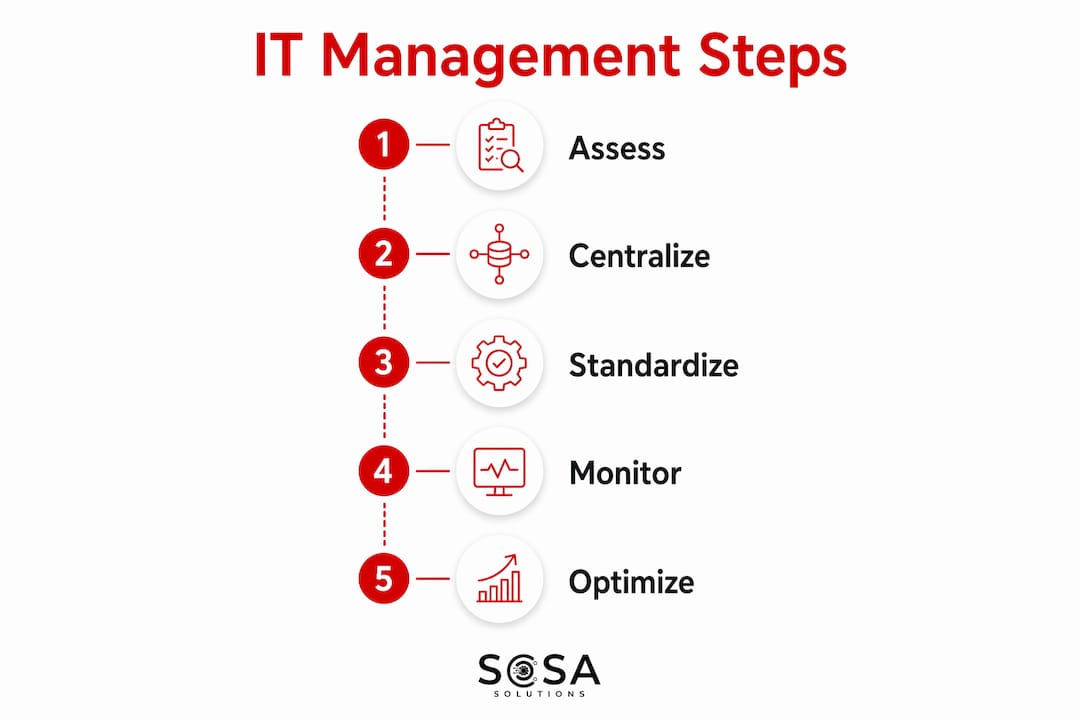
Assess current infrastructure. Visit or remotely audit each location. Document every device, application, network setup, and existing support process. Identify the three biggest gaps at each site.
Set up your centralized platform. Choose and deploy your ITSM and RMM tools before touching any location’s configuration. The platform is your control center. Everything else connects to it.
Onboard locations one at a time. Start with your highest-volume or most critical site. Apply the standard configuration template, enroll devices in UEM, and connect the site to your monitoring platform. Train the local point of contact on how to submit tickets.
Establish monitoring and reporting. Configure dashboards to show uptime, ticket volume, resolution times, and security alerts by location. Review these weekly during the first three months.
Run regular improvement cycles. Schedule a quarterly IT review for each location. Use ticket data to identify recurring problems and fix root causes rather than symptoms.
Pro Tip: Assign one named contact at each location who is not an IT professional but knows how to submit a ticket, reboot a router, and escalate an emergency. That person saves hours of remote troubleshooting time.
Common pitfalls include skipping the audit phase, deploying tools before policies exist, and failing to train local staff. The IT asset management guide for retailers covers how to define IT needs without over-hiring, which is a trap many growing SMBs fall into during expansion.
How to troubleshoot common IT challenges across multiple sites
Multi-site IT environments generate predictable problems. Knowing them in advance cuts resolution time significantly.
Inconsistent configurations: When one location runs an older software version or a different firewall rule, it creates security gaps and support complexity. Enforce configurations through your centralized management platform, not through manual checks.
Delayed support response: Without a tiered help desk and defined SLAs, remote sites wait too long for fixes. Set a maximum response time for each ticket tier and track it in your ITSM platform.
Security lapses at individual sites: Employees at remote locations often bypass security policies when no one is watching. Regular security awareness training and automated policy enforcement through UEM close this gap.
Disaster recovery gaps: Each location needs a tested recovery plan. Define recovery time objectives (RTOs) for critical systems and run a tabletop exercise at least once per year across all sites.
Communication breakdowns: IT teams and site managers often speak different languages. A shared incident communication template, sent to site managers during any outage, keeps everyone informed without requiring technical knowledge.
Centralized IT service management dashboards show ticket trends, SLA compliance, and location-specific issues that enable continuous improvement. A dashboard that shows one location generating 40% of all tickets is telling you exactly where to focus your next improvement effort. The centralized IT management guide for retail leaders goes deeper on how to use this data to drive decisions across multiple sites.
Key Takeaways
Effective multi-location IT management for SMBs requires centralized governance, standardized configurations, and a clear accountability structure before adding new tools or locations.
Point | Details |
Centralize before you scale | Deploy a single ITSM and RMM platform across all sites before expanding to new locations. |
Standardize hardware and software | Use one approved hardware list and software image to cut troubleshooting time across sites. |
Define a single accountability owner | Assign one internal lead or MSP as the named IT owner for all locations. |
MSPs reduce cost and complexity | Flat-rate MSP pricing replaces unpredictable salary costs and covers 24/7 monitoring. |
Use data to drive improvements | Review ticket trends and SLA compliance quarterly to fix root causes, not symptoms. |
What I have learned managing IT across multiple SMB locations
The biggest mistake I see SMBs make is buying tools before writing policies. A remote monitoring platform is useless if no one has defined what a critical alert looks like or who responds to it at 2 a.m. on a Saturday. Tools execute policies. They do not replace them.
The second lesson is that proactive management beats reactive break-fix support at every scale. SMBs expanding beyond 25 locations must shift from reactive break-fix IT to proactive, governance-first centralized management. That shift is not just about technology. It is a change in how leadership thinks about IT, from a cost center that fixes things to a function that prevents problems.
Choosing scalable tools early matters more than most owners realize. A ticketing system that works for two locations should still work for ten. If you outgrow your tools every time you add a site, you spend more time migrating than managing. Pick platforms with a clear growth path from the start.
Finally, the hybrid MSP model is underused by SMBs that think they have to choose between full outsourcing and full in-house staffing. A single internal generalist paired with a quality MSP covers more ground than either option alone, at a fraction of the cost of a full internal team.
— Christopher
Sosasolutionsnyc: managed IT for SMBs across New York and Florida
Sosasolutionsnyc works with SMBs that operate across multiple locations in New York and Florida, delivering managed IT services built around the same centralized, proactive model described throughout this article.

Whether you are opening a second retail location or managing a dozen sites across two states, Sosasolutionsnyc provides managed IT services that cover monitoring, help desk support, security, and infrastructure management under one predictable plan. The team also supports new store IT buildouts from day one, so your technology is ready before the doors open. Contact Sosasolutionsnyc to get a tailored IT plan for your locations.
FAQ
What is multi-location IT management for SMBs?
Multi-location IT management for SMBs is the centralized oversight of technology, security, and support across two or more business sites. It replaces site-by-site IT decisions with a unified strategy that applies consistent standards everywhere.
How much does managed IT cost for a multi-site SMB?
MSPs typically charge flat-rate pricing per user or device, which makes costs predictable and avoids the salary and overhead of full internal IT teams. The exact rate varies by coverage level and number of locations.
Do I need an internal IT person if I use an MSP?
Not necessarily. Fully outsourced MSP models work well for SMBs with no internal IT staff. Hybrid models, where one internal generalist works alongside an MSP, suit SMBs in the 25–50 person range and use an RACI matrix to prevent overlapping responsibilities.
What security controls are non-negotiable for multi-site SMBs?
MFA on every account, automated patch management, and tested backups are the three controls every multi-site SMB must have before adding any advanced security tools. These address the most common attack vectors at the lowest cost.
How do I keep IT consistent across all my locations?
Standardize your hardware catalog, software versions, and security configurations, then enforce them through a centralized UEM and RMM platform. Review ticket data quarterly to catch sites that are drifting from the standard before problems escalate.
Recommended


Comments