Managed IT for Corporate Offices: What Executives Need to Know

Managed IT for corporate offices is the outsourcing of continuous technology management and support to a specialized third-party provider, formally called a managed service provider (MSP), who operates under contractual service-level agreements (SLAs) to deliver proactive monitoring, security, and user support. Unlike the old break-fix model where IT teams respond only when something breaks, managed IT is proactive rather than reactive, meaning problems get caught before they disrupt operations. For corporate executives and office managers, this distinction matters because downtime is not just an inconvenience. It is a measurable cost to productivity, revenue, and reputation. Understanding what managed IT services for businesses actually include, how SLAs govern them, and what advantages they deliver over in-house teams gives you the foundation to make a confident infrastructure decision.
What is managed IT in corporate offices?
Managed IT in corporate offices is defined as the transfer of ongoing IT operational responsibility to an external MSP, who assumes accountability for performance outcomes rather than simply providing labor on demand. The MSP model governs via SLAs rather than headcount management, meaning you measure results against agreed metrics, not hours billed. This is a structural shift in how corporate IT management works. Instead of managing a team, you manage a contract and the outcomes it specifies.
The scope of managed IT support for offices typically covers the full technology stack that keeps daily operations running. Network infrastructure, end-user devices, software licensing, cybersecurity controls, and data backup all fall under the MSP’s responsibility. For a corporate office with 50 to 500 employees, this represents a significant operational surface area that demands consistent, expert attention. Managed IT solutions exist precisely to cover that surface without requiring the organization to build and retain a full internal IT department.

What services do managed IT providers offer corporate offices?
Common managed IT services for corporate offices include help desk and end-user support, network monitoring and management, cybersecurity controls, software and operating system patching, and business continuity and disaster recovery planning (BCDR). Each of these functions addresses a specific operational risk that, left unmanaged, can cause significant disruption.
Here is what each service category delivers in practice:
Help desk and end-user support: Employees get fast resolution for device issues, software problems, and access requests without waiting for an overloaded internal IT staffer. Response times are defined in the SLA.
Network monitoring and management: The MSP watches network health around the clock, identifying bandwidth issues, hardware failures, or unusual traffic patterns before they cause outages.
Cybersecurity: MSPs remotely administer firewalls, VPNs, and identity and access controls, which are the three most common entry points for corporate network breaches.
Software and OS patching: Unpatched systems are the leading cause of ransomware infections. MSPs apply updates on a scheduled basis, removing this risk from the internal team’s plate.
BCDR planning: Business continuity and disaster recovery planning defines how the organization recovers from data loss, hardware failure, or a cyberattack. MSPs build and test these plans as part of the managed service.
24/7 proactive monitoring: The distinction between 24/7 coverage and business-hours-only support is significant. Corporate offices with global operations or after-hours activity need round-the-clock coverage defined explicitly in the contract.
Pro Tip: Ask every MSP candidate to show you a sample incident report from a real client engagement. How they document, escalate, and resolve issues tells you more about their operational quality than any sales presentation.
How do SLAs shape managed IT services in corporate settings?
SLAs are the contractual backbone of every managed IT relationship. An SLA specifies measurable performance metrics including uptime guarantees, response times, resolution targets, and availability windows. Without a well-constructed SLA, managed IT services for businesses become vague promises rather than enforceable commitments.
A typical corporate SLA for managed IT services includes the following components:
Uptime guarantee: Usually expressed as a percentage, such as 99.9% network availability per month. This translates to less than 9 hours of allowable downtime annually.
Response time: The maximum time the MSP takes to acknowledge a reported issue. Critical incidents may require a 15-minute response; lower-priority tickets may allow 4 hours.
Resolution time: Separate from response time, this defines how long the MSP has to fully resolve an issue by severity tier.
Scope of coverage: Defines exactly which systems, locations, and user types fall under the agreement. Ambiguity here is the most common source of disputes.
Measurement windows: Specifies whether uptime is calculated monthly or annually, and whether scheduled maintenance counts against availability.
“Outsourcing network management can seem risky, but defining detailed SLAs and monitoring compliance mitigates these risks effectively.” — TechTarget
Effective managed IT contracts require clear definition of responsibilities, availability, and response time to prevent disputes from ambiguous terms. The most common failure point in corporate IT management contracts is not the technology. It is the language. Before signing, have your legal and operations teams review every exclusion clause and measurement definition in the SLA. What the contract does not say is often as important as what it does.
What are the advantages of managed IT versus in-house IT teams?
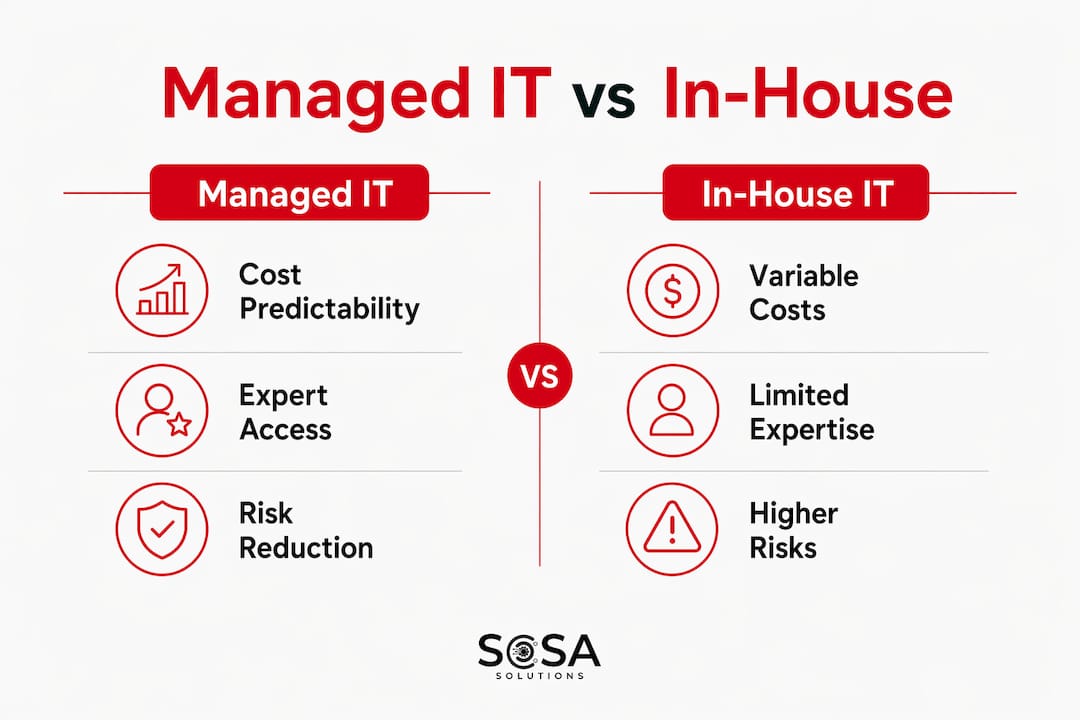
The core business case for managed IT services comes down to cost predictability, capability access, and risk reduction. Outsourcing enables cost efficiency and predictable monthly expenses compared to the unpredictable costs of in-house IT management, which includes salaries, benefits, training, hardware, and emergency contractor fees.
Factor | Managed IT (MSP) | In-house IT team |
Cost structure | Fixed monthly subscription | Variable: salaries, benefits, training, emergency spend |
Expertise depth | Access to a team of specialists | Limited to staff hired and retained |
Cybersecurity capability | Enterprise-grade tools included | Requires separate budget and hiring |
Scalability | Adjusts with contract terms | Requires new hires or layoffs |
Coverage hours | 24/7 available via SLA | Typically business hours only |
Response to new threats | MSP updates practices continuously | Depends on internal training cycles |
The talent gap argument is particularly relevant in 2026. Cybersecurity and cloud infrastructure specialists command salaries that most mid-sized corporate offices cannot sustain for a full internal team. An MSP spreads that expertise across dozens of clients, making enterprise-grade capability affordable at the SMB price point. The KPMG 2026 Managed Services Outlook Survey found that 99% of organizations view managed services as strategically important, with 50% actively prioritizing investment in AI and cybersecurity managed service capabilities. That near-universal adoption signals a market consensus that internal IT alone cannot meet modern corporate demands.
Pro Tip: Do not eliminate your internal IT role when adopting an MSP. The most effective model keeps one internal IT lead who owns vendor relationships, escalations, and strategic planning while the MSP handles continuous operations and rapid response.
The hybrid model where internal IT handles strategic initiatives while MSPs cover continuous maintenance is the approach most mature corporate offices use. It captures the benefits of managed IT without losing institutional knowledge or strategic control.
How can corporate offices select and implement managed IT solutions?
Selecting the right MSP requires a structured evaluation process, not just a vendor comparison on price. The goal is to find a provider whose capabilities match your specific corporate IT needs, whose SLA terms are enforceable, and whose team can integrate with your existing operations.
Key steps for effective selection and implementation include:
Assess your current IT environment first. Document every system, application, and user group before approaching vendors. MSPs price and scope services based on your actual environment, and gaps in your documentation become gaps in their coverage.
Evaluate vendor expertise against your specific needs. A provider with deep retail IT experience may not be the right fit for a financial services office with strict compliance requirements. Ask for case studies from clients in your industry and office size range.
Clarify SLA scope and response parameters in writing. Confirm coverage windows and define MSP versus internal IT responsibilities before signing. Every assumption should become a written term.
Plan the transition carefully. A phased onboarding over 30 to 90 days reduces risk. Start with monitoring and help desk, then layer in security and BCDR management as the relationship matures.
Build in scalability from the start. Your managed IT contract should include terms for adding locations, users, or services as your office grows. Renegotiating scope mid-contract is costly and disruptive.
Avoid the common pitfall of underspecifying security scope. Many corporate offices assume cybersecurity is included in a standard managed IT package. It often is not, or it covers only basic firewall management. Confirm exactly what security services are included and what requires a separate agreement.
The benefits of unified IT service providers extend beyond cost savings to include faster incident resolution and a single point of accountability, which matters when something goes wrong at 2 a.m. on a Sunday.
Key takeaways
Managed IT services work because they replace unpredictable, reactive IT management with contractually governed, proactive operations that give corporate offices cost control, security depth, and measurable performance.
Point | Details |
Core definition | Managed IT is outsourced, proactive IT management governed by SLAs, not reactive break-fix support. |
SLA specificity matters | Uptime, response times, and scope exclusions must be defined in writing to prevent disputes. |
Cost and capability advantage | Fixed monthly pricing replaces variable in-house costs and provides access to specialist expertise. |
Hybrid model is optimal | Internal IT handles strategy; the MSP covers continuous operations and rapid incident response. |
Selection requires preparation | Document your environment, verify vendor expertise, and confirm security scope before signing. |
Why managed IT strategy is the real differentiator in 2026
I have spent years watching corporate offices treat IT as a cost center to minimize rather than a capability to invest in. The organizations that get managed IT right are not the ones who found the cheapest MSP. They are the ones who treated the SLA negotiation as seriously as a real estate lease.
The KPMG data on near-universal strategic adoption of managed services is not surprising to me. What surprises me is how many executives still sign managed IT contracts without reading the scope exclusions. I have seen offices lose days of productivity because their MSP’s SLA covered network monitoring but explicitly excluded the VoIP system that the entire team used for client calls. That is not an MSP failure. That is a contract failure.
The AI and cybersecurity investment trend the KPMG survey highlights points to where managed IT is heading. MSPs that integrate AI-driven threat detection and automated patch management are already delivering faster response times and fewer incidents than those running manual processes. When you evaluate providers in 2026, ask specifically what AI tools they use in their monitoring stack and how those tools affect your SLA response commitments.
My honest recommendation: treat managed IT as a partnership focused on proactive management and measurable outcomes, not just a support ticket system you pay monthly. The executives who get the most value from their MSP relationships are the ones who review SLA performance reports quarterly and hold providers accountable to the numbers. That discipline is what separates a good managed IT investment from an expensive one.
— Christopher
How Sosasolutionsnyc supports your corporate IT needs
Sosasolutionsnyc delivers managed IT services tailored to corporate offices and retail environments across New York and Florida, with a focus on predictable performance, security, and expert support that scales with your operations.

Whether you are setting up a new office location or upgrading an existing IT infrastructure, Sosasolutionsnyc builds customized managed IT plans that define clear SLA terms, cover cybersecurity and network monitoring, and give your team a single point of contact for all technical issues. Their store opening IT solutions cover full infrastructure readiness from system setup to network configuration, making them a strong fit for corporate expansions and new location launches. If you want a provider who understands both the operational demands of corporate offices and the fast-moving needs of retail environments, contact Sosasolutionsnyc for an assessment and a customized managed IT plan.
FAQ
What is managed IT for corporate offices?
Managed IT for corporate offices is the outsourcing of ongoing technology management, including network monitoring, cybersecurity, help desk support, and software updates, to a third-party MSP operating under a formal SLA. The MSP takes proactive responsibility for IT performance rather than responding only when problems occur.
How does managed IT differ from break-fix IT support?
Managed services provide proactive continuous monitoring and maintenance under a fixed monthly contract, while break-fix support charges per incident and responds only after a problem is reported. The managed model reduces downtime and total cost over time.
What should a corporate SLA for managed IT include?
A corporate managed IT SLA should specify uptime guarantees, response and resolution times by incident severity, exact scope of covered systems, coverage hours, and measurement windows. Ambiguous scope definitions are the most common source of disputes between clients and MSPs.
How much does managed IT cost for a corporate office?
Managed IT services for businesses typically use a per-user or per-device monthly subscription model, which replaces the variable costs of salaries, emergency contractors, and unplanned hardware expenses. Pricing varies by scope, coverage hours, and security requirements, so get itemized quotes from at least three providers.
Can a corporate office use both an MSP and an internal IT team?
Yes, and the hybrid model is the most effective approach for most corporate offices. Internal IT staff handle strategic planning, vendor relationships, and business-specific projects, while the MSP covers continuous monitoring, rapid incident response, and routine maintenance under the SLA.
Recommended


Comments