Managed IT Services for SMBs: What You Need to Know

Running a small or medium-sized business means wearing a lot of hats. IT probably isn’t your favorite one. When your server crashes on a Friday afternoon or your point-of-sale system freezes mid-transaction, you’re not just dealing with a tech headache — you’re watching revenue walk out the door. Understanding what is managed IT services SMB means understanding a fundamentally different approach to technology support, one built on prevention rather than panic. This article breaks down exactly what managed IT services include, how the service models work, and how to choose the right fit for your business.
Table of Contents
Key Takeaways
Point | Details |
Managed IT is proactive, not reactive | MSPs monitor and maintain your systems continuously, reducing downtime before it starts. |
Predictable monthly pricing | Flat-rate or per-user models replace unpredictable repair bills and support budgeting accuracy. |
Multiple delivery models exist | Fully managed and co-managed options let you choose based on existing internal IT resources. |
Cybersecurity is a core component | MSPs apply frameworks like NIST CSF 2.0 to protect SMBs that lack in-house security staff. |
HaaS eliminates capital IT spending | Hardware-as-a-Service bundles devices into monthly fees, removing sudden hardware costs. |
What managed IT services for SMBs actually mean
The term “managed IT services” gets used loosely, so let’s be precise. In the industry, the recognized term is Managed Services, delivered by a Managed Service Provider (MSP). What this means in practice: instead of calling someone when something breaks, you pay a monthly fee for a third party to proactively monitor and maintain your entire IT environment around the clock.
This is the core shift that separates managed IT from the old break-fix model. With break-fix, you had no idea what IT would cost each month. With managed IT, you know exactly what you’re paying, and the provider has a financial incentive to keep things running because they eat the cost when things go wrong.
What do managed IT services include? Most contracts cover:
Help desk support: Remote and on-site troubleshooting for your staff
Network monitoring and management: 24/7 visibility into performance, threats, and outages
Cybersecurity management: Antivirus, patch management, endpoint protection, and threat response
Cloud administration: Managing cloud platforms like Microsoft 365 or Google Workspace
Data backup and disaster recovery: Scheduled backups with tested restore capabilities
Compliance support: Helping you meet regulatory requirements relevant to your industry
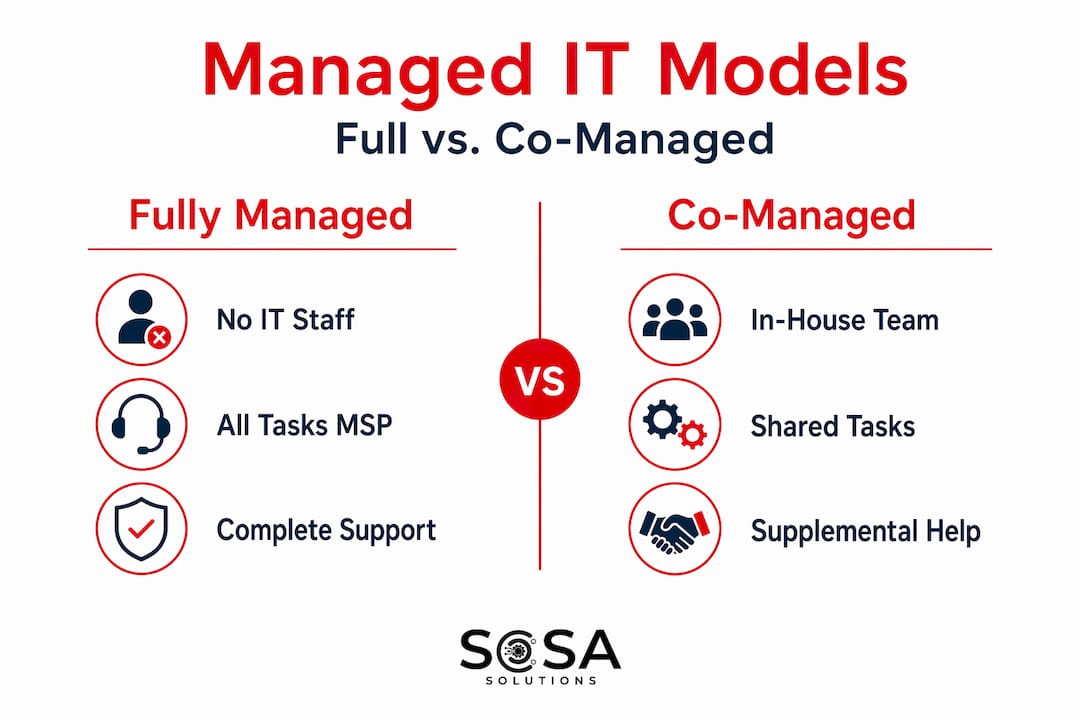
Beyond scope, the model also comes in two primary flavors. Fully managed means the MSP owns all IT responsibilities. Co-managed IT splits responsibilities between your internal team and the provider. Both are legitimate approaches, and the right choice depends on your current situation.
Pro Tip: When reviewing any MSP contract, ask specifically what is excluded. Many standard agreements do not cover hardware replacement, certain third-party software licenses, or after-hours support without an additional fee. Know the boundaries before you sign.
Benefits of managed IT that actually move the needle
The business case for managed IT services for small businesses comes down to risk and money. Consider this: a single IT outage can cost a small firm between $82,200 and $256,000 in lost revenue and recovery expenses. That number alone should make any SMB owner pay attention.
Here is what managed IT delivers in practice:
Predictable monthly costs. Flat monthly fee models turn IT from a variable expense that wrecks your budget into a line item you can plan around. Whether per-user or per-device, you know what you owe.
Reduced downtime. Proactive monitoring catches failing hardware, unusual network activity, or expiring certificates before they cause an outage. Your team keeps working.
Access to specialized expertise. Hiring a full internal IT team costs well over $200,000 annually in salaries alone. An MSP gives you a whole team of specialists for a fraction of that.
Stronger cybersecurity posture. 73% of small businesses report lacking sufficient cybersecurity personnel. An MSP covers that gap without adding headcount.
Business continuity as a default. Disaster recovery testing and failover support come packaged into managed offerings rather than being treated as an afterthought.
Scalability on demand. When you open a new location or add 20 employees, your MSP adjusts. No hiring, no new infrastructure contracts to negotiate from scratch.
“Managed services are more than a help desk; they represent a partnership where the MSP takes responsibility for outcomes through proactive management and defined performance metrics.” — TSIA
The scalability point is worth dwelling on. Retail SMBs expanding from one location to five do not need to rebuild their IT setup five times. The right MSP scales coverage to each new site, often faster and more reliably than an internal team could.
Types of managed IT service models for SMBs

Not all managed IT solutions for small companies are structured the same way. Understanding the delivery models helps you choose what actually fits your business instead of defaulting to the most expensive package.
Model | Best for | What the MSP handles | What you handle |
Fully managed | SMBs with no internal IT | Everything: monitoring, help desk, security, backups | Business decisions, not IT operations |
Co-managed | SMBs with existing IT staff | Monitoring, testing, after-hours coverage | Day-to-day admin and strategic IT decisions |
Hardware-as-a-Service (HaaS) | SMBs avoiding capital IT costs | Devices, lifecycle management, replacements | None. Hardware is covered in the monthly fee |
Cloud-focused managed IT | Modern, remote-first SMBs | Cloud platforms, identity management, SaaS apps | On-premises edge cases |
Hardware-as-a-Service is gaining real momentum in 2026. Instead of buying laptops, servers, and networking gear outright, you get those devices bundled into your monthly service fee with automatic lifecycle management and replacement. For SMBs that dread surprise capital expenses, HaaS eliminates that problem entirely.
The co-managed model is underused and underappreciated. If you already have an IT person on staff, you do not need to hand everything over to an MSP. Co-managed IT lets your internal resource focus on strategic priorities while the MSP handles monitoring, patch management, and after-hours coverage. It is a force multiplier, not a replacement.
Pro Tip: If you have one IT person managing everything for 50 employees, co-managed IT is probably your best starting point. It gives that person backup, after-hours coverage, and specialized tools without replacing their role.
For retail SMBs specifically, understanding retail IT support types helps map which managed model aligns with your in-store technology requirements, especially for point-of-sale systems and network reliability.
How to evaluate and choose the right MSP
Choosing managed IT services for your business is not just a technology decision. It is a vendor partnership decision. Here is what to look at carefully before signing anything.
Pricing model clarity. Per-user pricing scales cleanly as you hire. Per-device pricing works better if you have more machines than people. Flat-rate all-in pricing simplifies budgeting but read what is actually included. SMB-oriented managed IT pricing typically reflects one of these three structures, and each has tradeoffs.
Service level agreements (SLAs). An SLA defines what the MSP promises: response times, uptime guarantees, resolution windows. If an SLA does not commit to specific numbers, it is not an SLA worth signing. Ask for uptime commitments of at least 99.9% for critical systems and response times under four hours for high-priority issues.
Cybersecurity depth. NIST’s Small Business Cybersecurity guidance makes clear that even very small businesses can manage cybersecurity risk using structured frameworks. Ask your MSP candidate how they apply risk management frameworks to clients your size. Checklist-based approaches are not enough. You need ongoing risk assessment, not a one-time audit.
Disaster recovery specifics. Knowing an MSP offers backups is not enough. Managed disaster recovery should include scheduled restore testing and documented failover procedures. If they cannot tell you when they last verified your backup actually restored correctly, that is a red flag.
Key questions to ask every MSP you’re evaluating:
How often do you verify backup restores, and how do you report that to clients?
What does your monitoring platform flag, and how quickly does a human review alerts?
Can you show me a sample SLA from a current client similar to my business?
What happens if you miss an SLA commitment?
Pro Tip: Do not evaluate an MSP only by ticket response speed. Ask whether they verify backup completion and patch compliance consistently. Speed means nothing if your backup hasn’t been tested in six months.
Putting managed IT into practice for your SMB
Moving from a break-fix approach to a managed IT model does not happen overnight, but it does not need to be complicated either. Here is a practical path forward.
Audit your current IT environment. Document every device, software license, cloud subscription, and known pain point before speaking to any MSP. This gives you leverage in pricing conversations and sets a baseline for the SLA.
Define your requirements by priority. Separate must-haves (uptime, security, backups) from nice-to-haves (strategic consulting, hardware refresh). This prevents scope creep and keeps your initial contract focused.
Choose your delivery model first. Decide between fully managed and co-managed before evaluating individual providers. The model choice narrows your vendor pool quickly.
Run a 30-day onboarding evaluation. A good MSP should complete a full environment assessment, document your infrastructure, and establish monitoring baselines within the first month.
Set a quarterly review cadence. Managed IT is a partnership. Schedule regular business reviews with your MSP to assess performance against SLAs, review upcoming needs, and align IT priorities with business goals.
For retail SMBs, the integration requirements go deeper. Retail IT support for SMBs needs to account for point-of-sale reliability, payment security compliance (PCI DSS), and in-store network performance. Any MSP you consider for a retail environment should have documented experience managing these specific systems.
My take on managed IT as a real business tool
I have spent years watching SMB owners treat IT as a necessary evil rather than a business asset. They call someone when something breaks, pay the invoice, and hope it does not happen again. That cycle does not just cost money. It costs confidence, momentum, and growth.
In my experience, the businesses that get the most from managed IT are not the ones with the biggest contracts. They are the ones who treat the MSP relationship like a strategic partnership. They show up to quarterly reviews. They share their growth plans. They ask what the MSP is seeing across other clients. That context is genuinely valuable.
One misconception I keep encountering: SMBs that think they are too small for managed IT. There is no real minimum size threshold. I have seen a 10-person company benefit enormously from a basic managed package, specifically because they had zero IT resources and a cybersecurity exposure they did not even know existed.
On the co-managed versus fully managed question, the honest answer is that it depends entirely on your internal team’s capacity and skills. When an internal IT person is stretched thin across help desk tickets, network issues, and vendor management, co-managed IT is transformative. But when there is no internal IT at all, fully managed is not just convenient. It is the only responsible choice.
The future of managed IT for SMBs is heading toward tighter integration of cybersecurity, compliance, and cloud management as a single bundled offering. If your MSP still treats these as separate line items with separate teams, that is worth reconsidering. Integrated coverage means fewer gaps. And in cybersecurity especially, gaps are where the real damage happens.
— Christopher
How Sosasolutionsnyc helps SMBs in NY and FL
If you are a small or medium-sized business in New York or Florida and this article has you thinking about your current IT setup, Sosasolutionsnyc delivers exactly the kind of proactive, tailored managed IT services described here.

Whether you need fully managed IT support for a business with no internal IT, a co-managed arrangement to strengthen an existing team, or specialized support for a retail environment, Sosasolutionsnyc builds plans around your specific operations and growth plans. Their retail expertise is particularly deep, covering store opening IT solutions and ongoing in-store support for businesses across Manhattan and throughout Florida. They also support retail IT operations for established SMBs looking to stabilize and grow their technology infrastructure without unpredictable costs.
FAQ
What is managed IT services for an SMB?
Managed IT services for an SMB means outsourcing IT management to a third-party MSP on a subscription basis, shifting from reactive break-fix support to proactive monitoring and maintenance of your entire IT environment.
What do managed IT services typically include?
Most managed IT packages include help desk support, network monitoring, cybersecurity management, data backup, disaster recovery, cloud administration, and compliance assistance, all delivered as ongoing services under a single monthly fee.
How much does managed IT cost for a small business?
Pricing typically follows per-user or per-device flat rates, making costs predictable and scalable. Exact pricing varies by scope, business size, and the specific services included in your agreement.
What is the difference between fully managed and co-managed IT?
Fully managed means the MSP handles all IT responsibilities, ideal for businesses with no internal IT staff. Co-managed IT pairs the MSP with your existing IT team, with each side handling defined responsibilities based on capacity and expertise.
Why do SMBs need managed IT services for cybersecurity?
73% of small businesses lack sufficient cybersecurity personnel, making them especially vulnerable to attacks. Managed IT services extend cybersecurity coverage without requiring additional full-time hires, applying structured risk frameworks suited to your business size.
Recommended


Comments