Field IT Support Explained for Small Business Owners
- Sosa Solutions NYC
- Jun 6
- 9 min read
Updated: Aug 7

Field IT support is the practice of sending trained technicians directly to your business location to troubleshoot, repair, and maintain the technology systems your team depends on every day. Unlike remote support, which handles issues over the phone or through screen-sharing tools, field IT support puts a specialist physically on-site to resolve problems that cannot be fixed from a distance. For small and medium-sized businesses, this distinction matters enormously. A crashed point-of-sale system, a failed network switch, or a misconfigured server cannot wait for a mailed replacement or a remote session that hits a wall. IT support encompasses people, processes, and tools that keep technology usable, secure, and available, and field support is the layer that makes that promise real when physical intervention is the only path forward.
What is field IT support and what does it actually cover?
Field IT support, also called on-site IT support or field service support, is a recognized category within IT service management (ITSM). Field IT support technicians provide in-person technical support by troubleshooting hardware, software, networking, and telephony equipment at the client location. This definition matters because it separates field support from help desk work, which is primarily phone or chat-based, and from managed services, which often operate in the background through monitoring software.
For an SMB owner, understanding field IT support means recognizing the full scope of what a technician can do when they walk through your door. The work spans a wide range of technical disciplines, all tied to one goal: keeping your systems running so your people can do their jobs.
Common field IT support tasks include:
Hardware troubleshooting and repair: Diagnosing failed hard drives, replacing faulty network interface cards, repairing or swapping out printers, and addressing workstation failures that stop employees cold.
Software installation and configuration: Installing operating systems, business applications, and security tools directly on machines, then verifying they work correctly in your specific environment.
Network setup and connectivity fixes: Running cable, configuring routers and switches, resolving Wi-Fi dead zones, and addressing firewall or VPN issues that block access to critical systems.
Telephony and communication equipment: Setting up VoIP phones, troubleshooting headsets, and maintaining unified communications hardware.
Preventive maintenance: Cleaning equipment, updating firmware, replacing aging components before they fail, and auditing infrastructure for vulnerabilities.
Common IT support tasks include logging service requests and updating tickets to maintain accountability and reduce lost work time. That last point is worth emphasizing: field support is not just about fixing things. It generates a record of what broke, why, and how it was resolved, which feeds directly into smarter decisions later.
Pro Tip: Ask any field IT support provider how they document their visits. A technician who leaves without a written service report is a liability. That documentation is your audit trail and your protection if the same issue recurs.
How field IT support fits into your broader IT service framework
Many SMB owners treat field IT support as a standalone, break/fix service. A technician shows up, fixes the problem, leaves. That model is the most expensive and least effective way to use field support. Effective IT support involves governance, processes, and tools coordinating across departments, and field visits should be governed by the same structure.
The three core processes that field IT support plugs into are:
Incident management: When something breaks unexpectedly, a ticket is created, prioritized, and assigned. Field support handles incidents that cannot be resolved remotely. The ticket tracks the response time, the resolution, and the root cause.
Service request management: Planned work like new hardware installations, office moves, or equipment upgrades goes through a service request. Field technicians execute these requests on a scheduled basis, reducing disruption to your operations.
Change management: When a significant change is made to your IT environment, such as a network upgrade or a server migration, change management documents the plan, the risks, and the outcome. Field support executes the physical side of that change.
“A common failure mode in SMBs is treating field support as simply break/fix instead of integrating it with incident and change management processes. Strong IT programs feed resolved field issues back into governance processes to reduce recurring problems.” — Salesforce on IT service management
The practical benefit of this integration is fewer repeat failures. When a field technician resolves a network outage and logs the root cause, that information can trigger a change request to replace aging hardware before it fails again. Without that feedback loop, you are paying to fix the same problem repeatedly. Integrating field IT support feedback into incident and change management reduces repeat hardware and software failures by addressing root causes systematically. For retail businesses in particular, where a single point-of-sale outage can cost thousands of dollars in lost sales, that systematic approach is not optional. It is the difference between a reliable operation and a chaotic one.
Field IT support vs. remote IT support: which one do you actually need?

Remote IT support handles a surprisingly large volume of technical issues. Password resets, software errors, cloud application problems, and basic configuration changes can all be resolved without anyone leaving the office. For SMBs on tight budgets, remote support is fast and cost-effective for those scenarios.
The limitation becomes clear the moment a physical component is involved. Remote IT support is limited when physical hardware inspections or repairs are required, and field IT support is necessary for installation, hardware troubleshooting, and network infrastructure tasks that cannot be done remotely. A technician cannot replace a failed power supply over a video call.
Support type | Strengths | Limitations | Best use cases |
Remote IT support | Fast response, lower cost, no travel time | Cannot touch hardware, limited network diagnostics | Software errors, cloud issues, user account problems |
Field IT support | Hands-on repairs, full diagnostics, physical installation | Higher cost, scheduling required, travel time | Hardware failures, network setup, equipment installation |
Combined approach | Full coverage, faster resolution, proactive and reactive | Requires coordination between remote and field teams | Most SMB environments with mixed technology needs |
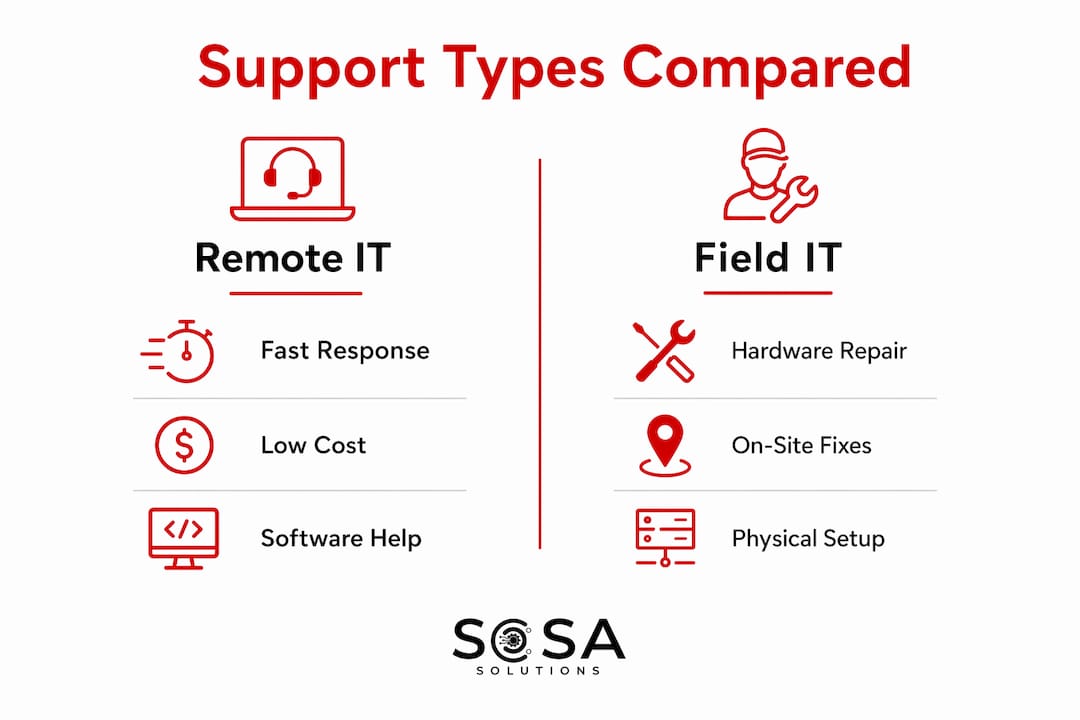
The combined approach is what most SMBs actually need, even if they do not realize it. SMBs benefit from balancing remote and field IT support to achieve faster issue resolution and lower downtime, maximizing technology investments. A managed IT provider that offers both remote monitoring and field dispatch gives you the fastest path to resolution regardless of what breaks.
Pro Tip: When evaluating IT support providers, ask specifically whether their remote team can dispatch a field technician without you having to call a separate number or open a new ticket. Seamless escalation from remote to field is a sign of a mature operation.
How SMBs can get the most from field IT support
Choosing the right field IT support model is not just about finding someone who can fix computers. It is about building a support structure that protects your operations and scales with your business. Here is what actually separates effective field IT support arrangements from costly, unreliable ones:
Prioritize response time guarantees in your contract. A service level agreement (SLA) that commits to a four-hour on-site response is meaningfully different from one that promises “next business day.” For retail businesses, restaurants, or any operation where downtime equals lost revenue, response time is the most important number in your contract.
Choose providers with documented processes, not just skilled technicians. A talented technician without a ticketing system, escalation path, or change management process is still a break/fix operation. Look for providers who use platforms like ServiceNow, Jira Service Management, or ConnectWise to manage field work.
Avoid pure break/fix arrangements if you can. Break/fix support means you only call when something is already broken. Proactive field support includes scheduled maintenance visits, firmware updates, and infrastructure audits that catch problems before they become outages.
Align field support scheduling with your business calendar. Strategic field IT support planning includes proactive service scheduling and alignment with business peak times to minimize disruptions. A retail store should not schedule a server upgrade the week before the holiday season.
Verify that your provider tracks and reports on field visits. Monthly or quarterly reports showing ticket volume, resolution times, and recurring issues give you the data to make smarter IT investment decisions.
Field IT support enables faster issue resolution on-site, which improves employee productivity and reduces downtime in SMB environments. That productivity gain is real and measurable. When a technician resolves a network failure in two hours instead of two days, every employee who was blocked gets back to work. For a 20-person office, that is a significant recovery of billable hours or customer-facing time.
Field support roles also extend beyond repairs. Field support roles involve user training, equipment setup, and preventative maintenance to reduce future incidents. A technician who installs new workstations and spends 30 minutes showing your team how to use them correctly prevents a wave of help desk tickets in the following weeks. That is the kind of value that does not show up in a break/fix invoice but absolutely shows up in your operational efficiency. For retail businesses, reviewing retail IT troubleshooting best practices alongside your field support plan gives you a clearer picture of where on-site intervention is most likely to be needed.
Pro Tip: Request a technology audit as part of your first field IT support engagement. A good technician will identify aging equipment, misconfigured systems, and security gaps that your current setup has been quietly ignoring. That audit pays for itself the first time it prevents an outage.
Key takeaways
Field IT support is the on-site layer of your IT service framework that handles what remote support cannot, and integrating it with incident, change, and service request management is what separates reliable SMB operations from reactive, costly ones.
Point | Details |
Field IT support definition | On-site technical assistance for hardware, software, network, and telephony issues at your business location. |
Integration with ITSM | Field visits should connect to incident, change, and service request management to prevent repeat failures. |
Remote vs. field support | Remote handles software and cloud issues; field support is required for physical hardware and infrastructure work. |
SLA response times matter | Contracts without guaranteed on-site response times leave SMBs exposed during critical outages. |
Proactive beats reactive | Scheduled maintenance and infrastructure audits reduce downtime more effectively than break/fix-only models. |
Why I think most SMBs are underusing field IT support
I have worked with dozens of small and medium-sized businesses across retail, professional services, and food and beverage, and the pattern is almost always the same. They call for field support when something breaks, the technician fixes it, and everyone moves on. Nobody asks why it broke. Nobody schedules a follow-up to check the rest of the infrastructure. The root cause goes unaddressed, and three months later the same problem shows up again, sometimes worse.
The misconception driving this pattern is that field IT support is a commodity. You call, someone shows up, you pay, done. That framing misses the real value entirely. The technicians who deliver the most value are the ones who treat every visit as a diagnostic opportunity, not just a repair call. They notice that your network switch is running hot, that your backup drive has not been tested in six months, or that three workstations are running an operating system version that stopped receiving security updates.
The future of field IT support for SMBs is not more technicians. It is smarter deployment. Field service management software improves scheduling and routing of field technicians, reducing travel time and improving efficiency. Providers who use these tools can get to you faster and spend more time solving problems instead of driving. When you are evaluating IT partners, ask whether they use FSM software. It tells you a lot about how seriously they take operational discipline.
My honest advice: treat your field IT support provider like a business partner, not a vendor. Share your growth plans, your peak seasons, and your technology roadmap. The providers who understand your business context deliver dramatically better outcomes than the ones who just respond to tickets. For SMBs thinking about outsourcing IT support, that partnership mindset is the single biggest factor in whether the arrangement succeeds.
— Christopher
How Sosasolutionsnyc supports SMBs with field and managed IT services
If you are a business owner in New York or Florida trying to build a reliable IT support structure, Sosasolutionsnyc delivers exactly the kind of integrated field and managed IT support described in this article.

Sosasolutionsnyc provides managed IT services across NY and FL that combine remote monitoring with on-site field support, giving your business full coverage without the overhead of an in-house IT team. From retail store openings and POS system setup to infrastructure upgrades and ongoing maintenance, their technicians operate within documented processes that connect every field visit to your broader IT service framework. Whether you are managing a single Manhattan location or multiple Florida storefronts, Sosasolutionsnyc builds support plans around your operational calendar, your growth plans, and your actual risk exposure. Reach out to learn how a tailored IT support arrangement can reduce your downtime and protect your bottom line.
FAQ
What is the field IT support definition in simple terms?
Field IT support is on-site technical assistance where a trained technician visits your business location to diagnose and resolve hardware, software, network, or telephony issues that cannot be handled remotely.
What does field IT support do that remote support cannot?
Field IT support handles physical tasks like hardware replacement, network cable installation, equipment setup, and hands-on diagnostics. Remote support cannot perform any task that requires physical access to a device or infrastructure component.
What are the main field IT support roles?
Field IT support roles include on-site troubleshooting, hardware repair, software installation, network configuration, preventive maintenance, and user training. Technicians also document every visit to support incident and change management processes.
Why is field IT support important for SMBs specifically?
For SMBs, a single hardware failure or network outage can halt operations entirely. Field IT support provides the rapid, hands-on response needed to restore systems quickly, protecting revenue and employee productivity in environments where downtime is not an option.
How do I know if my business needs field IT support or just remote support?
If your business relies on physical hardware like servers, POS systems, printers, or on-site networks, you need field IT support as part of your coverage. Remote support alone cannot address failures in any of those components.
Recommended
Comments