Why Retail Needs Data Backup: A 2026 Guide
Updated: Aug 7

Data backup is the operational safety net that keeps retail businesses running when hardware fails, ransomware strikes, or a software update corrupts your point-of-sale database. Without it, a single incident can erase months of transaction records, customer data, and inventory history. Retail operations depend on real-time data flows across ERP systems, POS terminals, and supply chains, which makes data loss far more disruptive than in most other industries. Understanding why retail needs data backup starts with recognizing that your data is not just a record of the past. It is the engine your store runs on today.
What are the biggest risks retail faces without data backup?
Retail businesses face a threat environment that has grown sharply more dangerous. Ransomware attacks increased by 37% in 2025, with average data breach costs reaching $4.44 million per incident. For a mid-size retailer in New York or Florida, that figure alone justifies the entire cost of a backup program many times over.
The financial damage does not stop at breach remediation. Enterprise downtime costs average $14,056 per minute, which means a two-hour outage during a Saturday sales peak can erase more than $1.6 million in operational value. Even smaller retailers face proportional losses when registers go dark and staff cannot process transactions.
The risks break down into three distinct categories:
Ransomware and cyberattacks. Modern ransomware actively targets backup infrastructure, including connected NAS devices and cloud backup accounts. Attackers know that destroying your backup is the fastest way to force a ransom payment.
Partial system failures. Retail ERP disruptions often involve partial failures that cause silent data inconsistencies rather than full outages. Your system appears to be running, but inventory counts, purchase orders, and customer records are quietly drifting out of sync.
Human error and hardware failure. Accidental file deletion and failed storage drives remain the most common causes of data loss across all business sizes. Neither requires a sophisticated attacker.
The impact of data loss in retail extends beyond the immediate financial hit. Customer trust erodes when order histories vanish or loyalty program data disappears. Regulatory exposure increases when transaction records cannot be produced for audits. The role of IT support response time becomes critical the moment any of these scenarios unfolds.
What best practices protect retail data effectively?
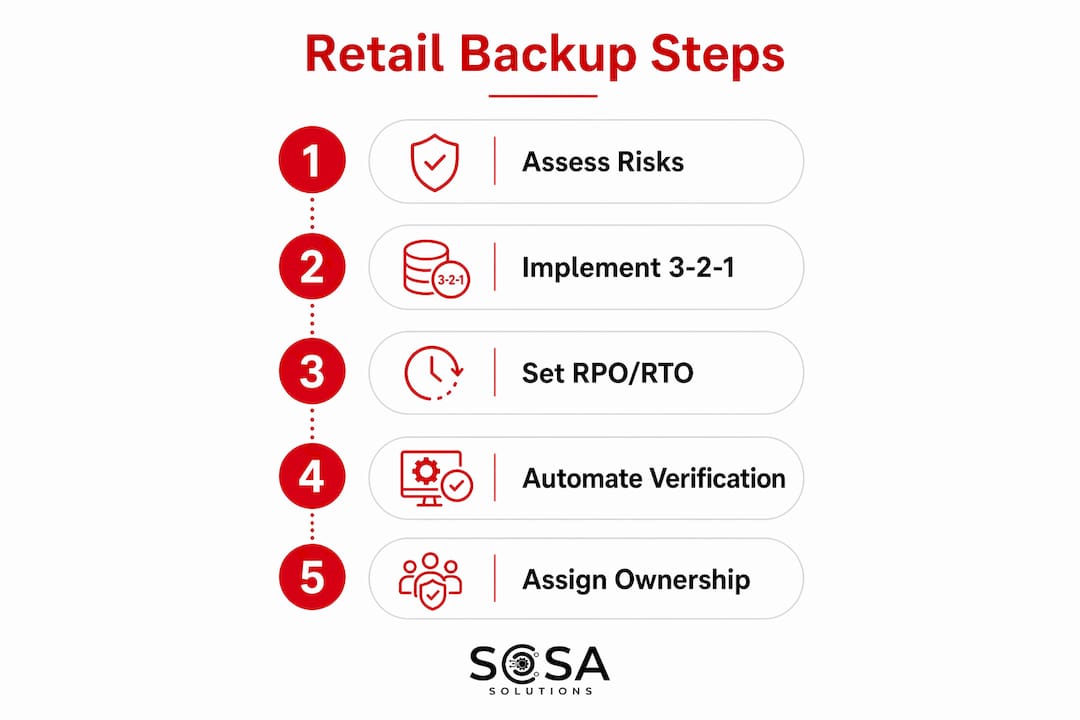
The most proven framework for retail data protection is the 3-2-1 backup rule. The 3-2-1 rule stores three copies of data across two different media types, with one copy kept off-site. This structure eliminates single points of failure across hardware, location, and media simultaneously. A retailer following this rule might keep one copy on a local NAS, one on a secondary on-premises server, and one in a cloud storage service like Microsoft Azure or Amazon S3.

In 2026, the 3-2-1 rule has been extended by most IT professionals to a 3-2-1-1-0 model. The additional “1” refers to an immutable or offline copy that ransomware cannot reach, and the “0” means zero unverified backups. This enhancement directly addresses the reality that ransomware now targets connected backup systems.
Here is how to build a retail backup strategy around these principles:
Define your Recovery Point Objective (RPO) and Recovery Time Objective (RTO). RPO is the maximum age of data you can afford to lose. RTO is the maximum time you can tolerate being offline. A busy retail store processing hundreds of transactions per hour needs an RPO measured in minutes, not hours.
Choose the right backup frequency. Nightly full backups are insufficient for high-transaction retail environments. Incremental backups running every 15 to 30 minutes protect far more data between snapshots.
Add immutable storage. Store at least one backup copy in write-once storage that cannot be modified or deleted, even by an administrator. Solutions like Veeam with immutable repositories or cloud-native object lock features in AWS S3 provide this protection.
Adopt synthetic full backups. Incremental backups reduce backup windows by over 80%, but a single corrupted incremental file can break the entire recovery chain. Synthetic full backups combine incremental data into a complete restore point without requiring a full re-backup, giving you speed and reliability together.
Pro Tip: Set your RPO and RTO based on the actual cost of downtime for your specific store, not on what your backup software defaults to. A boutique with 50 daily transactions has very different needs than a multi-location retailer processing 5,000.
Backup type | Best use case |
Full backup | Weekly baseline; stored off-site or in immutable cloud storage |
Incremental backup | Every 15 to 60 minutes for active retail workloads |
Synthetic full backup | Daily consolidation to reduce restore chain risk |
Immutable snapshot | Ransomware defense; write-once, cannot be altered |
How do modern retail systems speed up data recovery?
Recovery speed is where modern retail data protection strategies separate from legacy approaches. Hybrid cloud strategies can reduce recovery times by 70 to 80% compared to traditional tape or on-premises-only backups. South African retail group TFG achieved exactly this result by shifting to a cloud-integrated architecture, cutting restore windows from hours to minutes across dozens of store locations.
Three technologies drive this improvement:
Instant VM recovery. Tools like Veeam Backup and Replication can boot a virtual machine directly from a backup file while the full restore runs in the background. Your POS system or ERP is operational within minutes rather than waiting for a complete data transfer.
Containerized workload backups. Retailers running Kubernetes-based applications or microservices need backup tools that understand container orchestration. Traditional file-level backups miss the configuration state and persistent volume data that containers depend on.
Tiered recovery architecture. Not all retail data carries equal urgency. Tiered recovery architectures assign recovery priority based on business criticality, restoring POS and payment processing first, then inventory management, then historical reporting.
Pro Tip: Map your application dependencies before a crisis, not during one. Knowing that your ERP cannot start until the authentication server is online will save you 30 minutes of confusion during a real outage.
Automated restore verification involving VM boots is the only reliable way to confirm backups are truly usable, and weekly tests are recommended for critical retail workloads. A backup that has never been tested is not a backup. It is a hope. Retailers who skip this step routinely discover during an actual incident that their backups are corrupted, incomplete, or incompatible with current system versions.
What should retail managers consider when implementing a backup plan?
Implementation is where most retail backup strategies fail. The technology is often sound, but the governance around it is not. Backup and disaster recovery governance failures, including inconsistent retention policies, missing encryption standards, and unclear ownership of recovery tasks, frequently undermine even well-designed backup systems.
Practical implementation requires attention to four areas:
Policy documentation. Write down your RPO, RTO, backup schedule, retention periods, and who is responsible for each task. Undocumented policies are not enforced consistently, especially when the person who set them up leaves the company.
Encryption at rest and in transit. Every backup copy, whether stored locally or in the cloud, must be encrypted. Unencrypted backups containing customer payment data create compliance exposure under PCI DSS and state-level privacy laws.
Scenario-based DR testing. Run at least one full disaster recovery exercise per quarter that simulates a realistic failure scenario, such as a ransomware attack that has encrypted your primary storage and your connected backup. Test whether your team can recover from the immutable copy alone.
ERP workflow coordination. Retail ERP systems like SAP, Microsoft Dynamics 365, and Oracle Retail run continuous background processes. Scheduling backups without accounting for these workflows can produce backups that appear complete but contain transactional inconsistencies.
Pro Tip: Assign a named owner for every backup job, not just a team. When an alert fires at 2 a.m. indicating a failed backup, “the IT team” does not answer the phone. A named person does.
Retailers working with outsourced IT support gain a significant advantage here because governance documentation, testing schedules, and on-call escalation paths are built into the service agreement rather than left to internal staff who are already stretched thin.
Key takeaways
Retail data backup is not optional infrastructure. It is the difference between recovering from a crisis in minutes and losing your business to one.
Point | Details |
Ransomware risk is growing | Attacks rose 37% in 2025, with breach costs averaging $4.44 million per incident. |
Downtime is expensive | Enterprise outages cost $14,056 per minute, making fast recovery a direct revenue protection measure. |
3-2-1 rule is the baseline | Three copies, two media types, one off-site location eliminates single points of failure. |
Test restores weekly | Automated VM boot tests are the only way to confirm backups are actually usable. |
Governance matters as much as technology | Documented policies, named owners, and encryption standards prevent failures that tools alone cannot prevent. |
The part most retailers get wrong about backup
I have worked with retail businesses across New York and Florida for years, and the pattern I see most often is not a lack of backup technology. It is a lack of backup confidence. Store owners invest in a backup solution, set it up once, and then assume it is working. They never test it. They never update the recovery objectives as the business grows. They find out the backup failed at the worst possible moment.
The retailers who handle incidents well share one habit: they treat their backup system like a piece of operational equipment that needs regular maintenance, not a set-it-and-forget-it insurance policy. They run quarterly recovery drills. They review retention policies when they add a new software platform. They know their RTO by heart because they have actually measured it.
There is also a mindset shift worth making. Data backup is not a cost center. It is what allows you to take risks in other parts of the business, knowing that a failed software rollout or a ransomware attack will not end the company. The retailers I have seen invest seriously in retail data protection strategies are also the ones who move faster on new technology, because they know they can recover if something goes wrong.
The uncomfortable truth is that most retail data loss incidents are survivable with the right backup in place. The ones that are not survivable almost always trace back to a backup that was never tested.
— Christopher
How Sosasolutionsnyc helps retailers protect their data

Sosasolutionsnyc works with retail businesses across New York and Florida to design and manage backup systems that actually hold up under real-world conditions. The team specializes in hybrid cloud backup architecture, immutable storage configuration, ransomware protection, and tested recovery time optimization for retail environments ranging from single-location boutiques to multi-store operations. Every engagement includes documented RPO and RTO targets, automated restore verification, and governance policies built around your specific ERP and POS stack. If your current backup strategy has never been tested under a realistic failure scenario, that is the right place to start. Explore managed IT services built specifically for retail businesses in NY and FL, or learn more about retail IT support options tailored to your store’s needs.
FAQ
What is the 3-2-1 backup rule for retail?
The 3-2-1 rule stores three copies of your data across two different media types, with one copy kept off-site or in the cloud. It eliminates single points of failure and remains the baseline standard for retail data protection in 2026.
How often should a retail store back up its data?
High-transaction retail environments should run incremental backups every 15 to 60 minutes, with daily synthetic full backups and weekly full backups stored off-site. The right frequency depends on your Recovery Point Objective, which should reflect the actual cost of losing that data.
What does data loss actually cost a retail business?
Beyond the average breach cost of $4.44 million for larger organizations, enterprise-level downtime runs $14,056 per minute. Smaller retailers face proportional losses in sales, customer trust, and compliance exposure when records cannot be recovered.
How do I know if my backups are actually working?
Automated restore verification that boots a virtual machine from the backup file is the only reliable test. Weekly testing is recommended for critical retail workloads. A backup that has never been restored is unverified and should not be relied upon.
Can ransomware destroy my backups?
Yes. Modern ransomware specifically targets connected backup systems, including NAS devices and cloud backup accounts. Immutable storage, which cannot be modified or deleted even by an administrator, is now a baseline requirement for any retail backup strategy.
Recommended


Comments